
Download ArkDesign – AI Architectural Design Software, Free Trial, US Code Compliance
Introduction
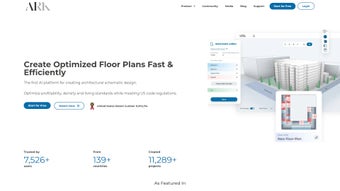
In the fast‑moving world of architectural design, speed and compliance have become as critical as creativity. ArkDesign answers that demand by delivering a cloud‑based, AI‑driven engine that creates multi‑family and mixed‑use floor plans in seconds while automatically checking every layout against the latest United States building codes. The platform is built for architects, developers, and design firms that need to generate high‑density concepts, evaluate profitability, and collaborate across teams without the usual bottlenecks of manual drafting.
By combining a powerful data‑analytics core with an intuitive browser interface, ArkDesign eliminates the repetitive tasks that traditionally consume weeks of a project’s schematic phase. Whether you are working from a Windows workstation, a macOS laptop, or a Linux server, the software runs entirely in modern browsers, meaning you can access your projects from any device, anywhere. The free trial lowers the entry barrier, allowing firms of any size to test the AI’s capabilities before committing to a subscription.
In the sections that follow, we will explore the core capabilities, walk through the onboarding process, examine system compatibility, and weigh the pros and cons based on real‑world usage. By the end of this review, you will have a clear picture of how ArkDesign can accelerate your design workflow, improve decision‑making, and keep your projects firmly within regulatory boundaries.
Overview & Core Features
ArkDesign is a web‑based AI platform that transforms schematic design for multi‑family and mixed‑use projects. Users begin by feeding key project parameters—site dimensions, desired unit mix, density targets, parking requirements, and local jurisdiction—into a guided form. The AI engine instantly generates multiple layout alternatives, each annotated with profitability metrics such as saleable square footage, projected revenue, and unit count.
What truly sets ArkDesign apart is its deep integration with U.S. building codes. The system pulls the most recent International Building Code (IBC), International Residential Code (IRC), and local amendments, then validates each generated plan in real time, flagging any violations before they become costly redesigns. The platform also includes a density and profitability analyzer, collaborative cloud workspace, and secure data handling.
Below is a concise list of the most impactful features:
- AI‑Powered Layout Generation: Instantly produce multiple compliant floor‑plan options based on entered constraints.
- US Building Code Integration: Real‑time validation against IBC, IRC, and local ordinances ensures first‑draft compliance.
- Profitability & Density Analyzer: Automatic calculations of saleable area, unit count, and revenue projections.
- Multi‑Family & Mixed‑Use Templates: Pre‑built configurations for apartments, condos, live‑work spaces, and commercial components.
- Instant Iterations: Adjust parameters on the fly and receive regenerated layouts in seconds.
- Collaborative Cloud Workspace: Share projects, comment, and export to DWG, PDF, or IFC without leaving the browser.
- Learning Resources: Free trial, video tutorials, searchable glossary, and community forum for ongoing support.
- Secure Data Handling: End‑to‑end encryption, role‑based access, and GDPR‑compatible privacy policies.
Installation & Usage Guide – From First Click to Final Plan
ArkDesign’s SaaS model eliminates the need for bulky installers or license keys. All you need is a modern web browser (Chrome, Edge, Firefox, or Safari) and an internet connection. Follow these steps to launch your first project and experience the AI workflow:
- Create an Account: Visit arkdesign.com, click “Sign Up,” provide a professional email, set a strong password, and verify the account via the confirmation email.
- Select a Subscription: Start with the free trial, which includes three fully featured projects. After the trial, upgrade to the Professional plan at $149 USD per month for unlimited projects and priority support.
- Start a New Project: From the dashboard, click “New Project,” enter project name, address, and select the jurisdiction. The platform automatically imports the latest local code data.
- Define Design Parameters: Input site size, target unit mix (studio, 1‑BR, 2‑BR, etc.), parking ratios, amenity requirements, and performance targets such as FAR or maximum building height.
- Run the AI Engine: Hit “Generate Layouts.” Within seconds, ArkDesign presents several schematic options, each with a compliance badge and profitability snapshot.
- Iterate Quickly: Use the side panel to tweak any variable—corridor width, unit depth, or parking count—and watch the AI instantly refresh the design.
- Export & Share: When satisfied, export to DWG for detailed drafting in Revit or AutoCAD, or generate a PDF for stakeholder review. Invite collaborators via email, assign comments, and track revision history in the cloud workspace.
- Leverage Support Resources: If you encounter questions, the built‑in help center offers searchable articles, video walkthroughs, and live chat during business hours. The community forum provides peer‑to‑peer tips on maximizing density and navigating complex code clauses.
Because ArkDesign is continuously updated on the server side, you always work with the latest AI improvements and code libraries without manual patches. This seamless update cycle, combined with an intuitive UI, transforms the traditionally labor‑intensive schematic phase into a fast, data‑rich collaboration experience.
Compatibility, Pros & Cons, and Frequently Asked Questions
Operating System Compatibility
As a browser‑based solution, ArkDesign runs on any operating system that supports modern web standards. Whether you are on Windows 10/11, macOS Ventura, Linux distributions, or ChromeOS, you can access the full feature set via Chrome, Edge, Firefox, or Safari. The interface adapts to both desktop monitors and tablet screens, enabling on‑site design reviews on iPad or Android tablets.
Pros
- Lightning‑fast generation of code‑compliant multi‑family layouts saves weeks of manual drafting.
- Built‑in U.S. code engine eliminates early‑stage compliance errors.
- Cloud‑native collaboration removes version‑control headaches.
- Profitability analytics align design decisions with market realities.
- Free trial and extensive learning resources lower entry barriers.
- Secure, encrypted data storage protects sensitive project information.
Cons
- Exclusively focused on U.S. building codes; not suitable for international projects.
- Does not support single‑family residential design, limiting broader portfolio use.
- Requires a stable internet connection; offline work is not possible.
- Advanced features such as unlimited projects and priority support require a paid subscription.
- Export formats limited to DWG, PDF, and IFC; niche BIM tools may need extra conversion steps.
How does ArkDesign stay up‑to‑date with the latest building codes?
ArkDesign connects to a continuously refreshed database of the International Building Code (IBC), International Residential Code (IRC), and local amendments. When you select a city or county, the system pulls the most recent ordinances and validates every generated layout in real time.
Can the platform handle mixed‑use projects that include retail or office space?
Yes. ArkDesign provides templates for commercial components, allowing you to define retail footprints, loading zones, and vertical circulation. The AI balances the differing code requirements for residential and commercial uses within a single layout.
What file formats are available for export?
Exports are available in DWG (AutoCAD), PDF (for stakeholder review), and IFC (for BIM workflows in Revit, ArchiCAD, and other BIM platforms).
Is there a limit on the number of projects I can create during the free trial?
The free trial permits up to three fully featured projects, giving you enough room to explore the AI engine, test code compliance, and evaluate profitability analytics before deciding on a paid plan.
How secure is my data on ArkDesign’s cloud servers?
All data is encrypted in transit (TLS 1.3) and at rest (AES‑256). Role‑based access controls let you grant specific permissions, and regular third‑party security audits ensure compliance with industry best practices.
Conclusion – Elevate Your Architectural Workflow Today
ArkDesign represents a major step forward for firms that specialize in multi‑family and mixed‑use developments within the United States. By automating the schematic phase, providing instant profitability insights, and guaranteeing code compliance, the platform reduces design time, minimizes costly revisions, and frees architects to focus on creativity rather than paperwork. While its scope is deliberately limited to U.S. regulations and larger‑scale projects, the depth of its AI engine and the richness of its analytical tools make it a compelling addition to any modern practice. If you are ready to accelerate concept generation, improve decision‑making, and deliver market‑ready designs faster than ever before, start your free trial of ArkDesign today. Click the “Download” button, explore the tutorials, and experience how AI can transform your design workflow.
Pros
- Rapid AI‑generated floor plans
- Comprehensive U.S. code compliance
- Robust profitability analytics
- Cloud‑based collaboration
- Secure data handling
Cons
- No international code support
- Excludes single‑family residential designs
- Requires internet connectivity



.png)



